 SiteSignal
If you run AEO for twenty clients, someone on your team builds twenty AI visibility reports a month. Most of that time goes on forms: the domain, the business facts, the buyer questions, the branding. Then you wait for the checks to run.
With the SiteSignal MCP server connected, you type one sentence in Claude and it does the forms for you. You still check the facts and the questions. You just don't click through them.
Short answer: Create an access token on the MCP page in SiteSignal. Add the server to Claude Code with claude mcp add, using the token as an Authorization header. Then ask: "Create a branded AEO report for prospect.com, prepared by [your agency]." Check the facts and questions it shows you, and it runs the report. It needs the Agency plan.
What you need
- A SiteSignal Agency plan. Report creation from Claude is part of the Agency plan, with 50 branded prospect reports a month.
- Claude Code, or another MCP client that lets you set a custom header. The server uses Streamable HTTP.
- Two minutes for the setup. You only do it once per device. New to SiteSignal? The 5-minute agency setup video covers the account and AI keys first.
Step 1: Create an access token
Log in to SiteSignal and open the MCP page at vitals.sitesignal.app/mcp. Click Create Access Token and give it a name, such as "Claude on my laptop".
The token starts with pat_ and is shown once, so copy it now. Each token is a private key for one assistant or device. The assistant sees exactly what you see in SiteSignal, never another customer's data. You can revoke a token from the same page at any time.
Step 2: Connect Claude
In a terminal, run this single command once. Replace the token with yours:
claude mcp add --transport http sitesignal https://mcp.sitesignal.app/mcp -H "Authorization: Bearer pat_YOUR_TOKEN"It works the same in PowerShell, Command Prompt, macOS and Linux. You can also copy it, with the copy button, from the Claude Code tab on the MCP page.
Start Claude Code and type /mcp. You should see sitesignal listed as connected.
Claude app (web or desktop): open Settings, then Connectors, then Add custom connector, and paste the server URL. If your plan lets you set a custom header, add the Authorization header. If it only offers OAuth, use Claude Code for now.
Other MCP clients: any client that supports remote MCP servers (Streamable HTTP) with a custom header can connect. Use the server URL https://mcp.sitesignal.app/mcp and the header Authorization: Bearer pat_YOUR_TOKEN.
Step 3: Ask for the report
Give Claude the prospect's domain, their main market, your agency name and the prospect's name. This is the prompt we used:
Create a branded AEO report for chandlersoftware.com. UK market.
Prepared by BBH, for Chandler. Show me the business facts and the
buyer questions before you run it.
The last sentence matters. It makes Claude stop at the two points where your judgement counts.
Step 4: Check the business facts
SiteSignal reads the prospect's site and pulls out the facts it will test AI against: the brand name, location, phone number, audience and industry. For Chandler it found the brand name, the Kolonnawa (Sri Lanka) headquarters, the phone number, the audience and the industry. All matched the site.
The founder and founding year came back as unknown, because the site doesn't publish them. That is worth knowing before the meeting: if the site doesn't say it, AI has to guess. If a fact is wrong, tell Claude the right answer and it saves the correction.
Step 5: Fix the buyer questions
Next, SiteSignal drafts the questions a buyer would ask AI. For Chandler it drafted seven. Two of them named the brand: "Chandler software for ship chandling operations" and "Best alternatives to Chandler".
A buyer who already knows the brand name doesn't need AI to find it. We asked Claude to reword both:
- "Which software do ship chandlers use to send quotes and invoices faster?"
- "What is the best ship chandlery management software?"
We also added the pricing page to the pages SiteSignal audits. Keep brand names out of the buyer questions. Leave the one brand question SiteSignal adds on its own ("What are people saying about Chandler?"). It shows whether AI knows the brand at all.
Step 6: Brand it and run it
Claude puts your agency name and the prospect's name on the cover, then starts the run: the AI visibility checks, an uptime and SSL check, and an audit of each page. About five minutes later, the report is ready and Claude gives you the share link.
What the report showed
We tested four buying questions on ChatGPT, Perplexity and Google AI Overviews. Chandler was not named once. The brand question, "What are people saying about Chandler?", did not surface the product on any of the three either.
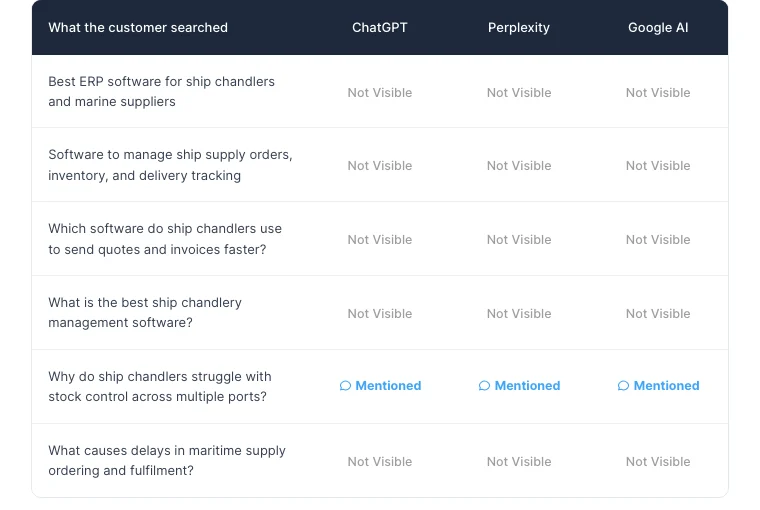
AI cited other ship chandler software vendors instead, including Seaborn, A2000 and Tidal pages.
One row says "Mentioned" on all three engines: "Why do ship chandlers struggle with stock control across multiple ports?" Read it carefully. That question is about the trade, not about software, so the likely reason is the word "chandler" itself. When a brand name is also a common word, open the full answer before you count a mention. That is a useful point to raise in the meeting, too: a generic name makes AI visibility harder.
The tools Claude uses
You don't need to call these yourself. Claude picks them. It helps to know what each one does when you read its progress.
| Tool | What it does |
|---|---|
sitesignal_create_branded_report | Creates the report for a domain and starts the research. Uses one report from your monthly quota. |
sitesignal_get_branded_report_progress | Shows the facts, the facts check and the questions as each step finishes. |
sitesignal_confirm_branded_report_facts | Saves your corrections and checks what AI gets wrong about the business. |
sitesignal_generate_branded_report_prompts | Drafts the buyer questions and key pages. |
sitesignal_update_branded_report_prompts | Rewords questions and adds or changes pages. |
sitesignal_set_branded_report_white_label | Puts your agency name and the prospect's name on the cover. |
sitesignal_run_branded_report | Starts the AI checks, uptime and SSL check, and page audits. |
sitesignal_get_branded_report | Returns the results and the share link. |
sitesignal_list_branded_reports | Lists your reports with their share links. |
Tips from our runs
- Ask Claude to pause before the run. A run can only happen once per report, and it uses your quota.
- Write questions the way a buyer talks. "Best [service] for [type of business]" and "How do I [solve problem]" work well.
- Batch your prospects. Give Claude a list of domains with their markets and ask for one report each, pausing for your check on each one.
- Open the report before you send it. Read the full answers behind any "Mentioned" result, as in the Chandler example.
Turn the report into a proposal
The report is the proof. The proposal is what sells the work. Our free AEO proposal kit includes a 22-slide template that turns these results into a 90-day plan and a price. The step-by-step proposal guide shows how to fill it with free tools.
Start with the Agency plan
Report creation from Claude comes with the SiteSignal Agency plan: 3 client domains for $399 a month, $89 for each extra domain, 50 branded prospect reports a month, and white-label monthly client reports. Every plan starts with a 7-day free trial.
Frequently asked questions
Does the SiteSignal MCP server work with ChatGPT?
Not yet. You connect with a server URL and a token sent as a header. ChatGPT's connectors don't accept a custom header today. Claude Code does, and so do other MCP clients that support a custom header, such as Cursor.
Which SiteSignal plan includes report creation from Claude?
The Agency plan: $399 a month for 3 client domains, plus $89 for each extra domain. It includes 50 branded prospect reports a month.
Can the AI assistant see other customers' data?
No. Each access token is tied to your account. The assistant sees exactly what you see in SiteSignal and nothing else.
How long does one report take?
About five minutes after you start the run. Setting it up in Claude takes one or two minutes, most of it checking the facts and questions.
Can I add my agency logo from Claude?
Not yet. Claude can set your agency name and the prospect's name on the cover. Logo upload is only in the web app.
Is the report the same as the one from the web app?
Yes. The MCP server runs the same steps as the Generate Client Report wizard and produces the same shareable report link.