 SiteSignal
Most "AI visibility" tools dump charts on you. SiteSignal hands you a short list of moves - the ones that actually shift the recommendation.
01
Connect your domain
Drop in a URL and your top three competitors. We start monitoring within minutes - no pixels, no installs.
02
We analyze the LLMs (The Methodology)
We use a proprietary methodology to query ChatGPT, Claude, and Perplexity across thousands of semantic vectors. We measure your Share of Voice (SOV) against competitors and detect entity discrepancies in real-time.
03
You get a plan, not a dashboard
Every Monday: a short, ranked list of what to fix this week - and the proof of why it matters.
Real-World Example
Not a weekly report.
A plan that evolves
as AI does.
Here is how a real SiteSignal action plan adapts for a B2B Law Firm over three weeks. We don't just find errors; we orchestrate the recovery strategy.
The action plan is the strategist. It starts with your foundations, verifies your fixes, and continuously adapts based on shifting LLM data.
W1
Week 1 · The Baseline Alert
Competitor Recommendation Detected
Alert: ChatGPT recommends a rival firm for "best commercial litigator."
Action: Rebuild your primary Organization schema to include missing service nodes.
Action: Update attorney bios to explicitly mention recent trial victories.
W1+
End of week 1 · Verification
Schema Verified & Next Steps Unlocked
SiteSignal verifies that search engines have indexed your new schema.
Action: Seed targeted Q&A content addressing exact prompt variations found in Perplexity.
Offsite Strategy Unlocked
W2+
Week 2 onwards · Offsite Defense
Hallucination Prevention
Alert: Claude incorrectly claims your firm offers "free initial consultations."
Action: Deploy a dedicated pricing/consultation page to correct the LLM training corpus.
Action: Submit PR update to legal directories clarifying the fee structure.
∞
Always running in background
Continuous AI Brain
Monitoring Citation mix, brand sentiment, and LLM behavior patterns.
Tracking competitor visibility shifts across all major models.
Inside the product
Built for the question
"so what do I do?"
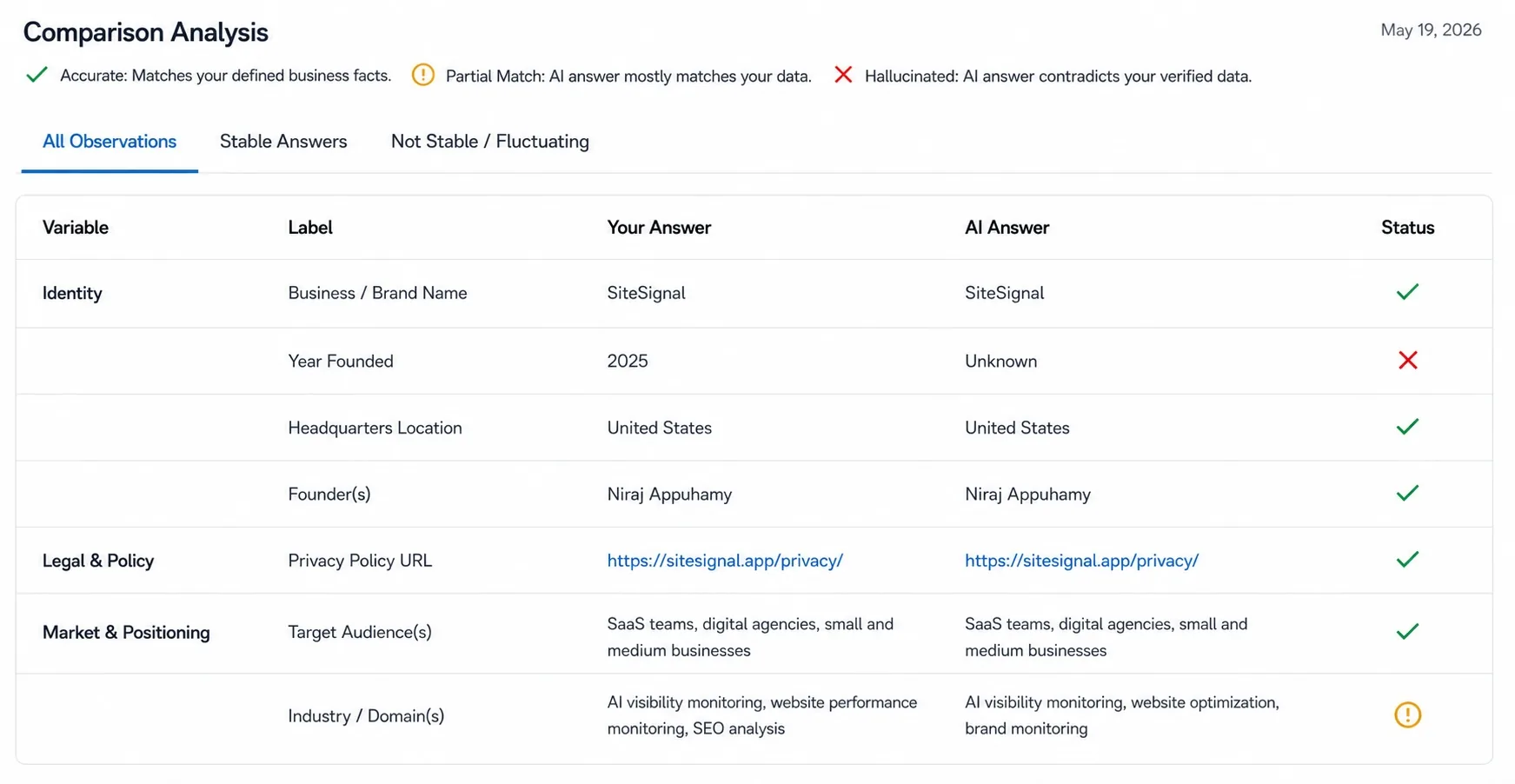
Hallucination feedCatch the lies before customers do.
We diff what AI says about you against your real site every day. Wrong pricing, dead links, made-up features - flagged with the exact prompt that surfaced them.
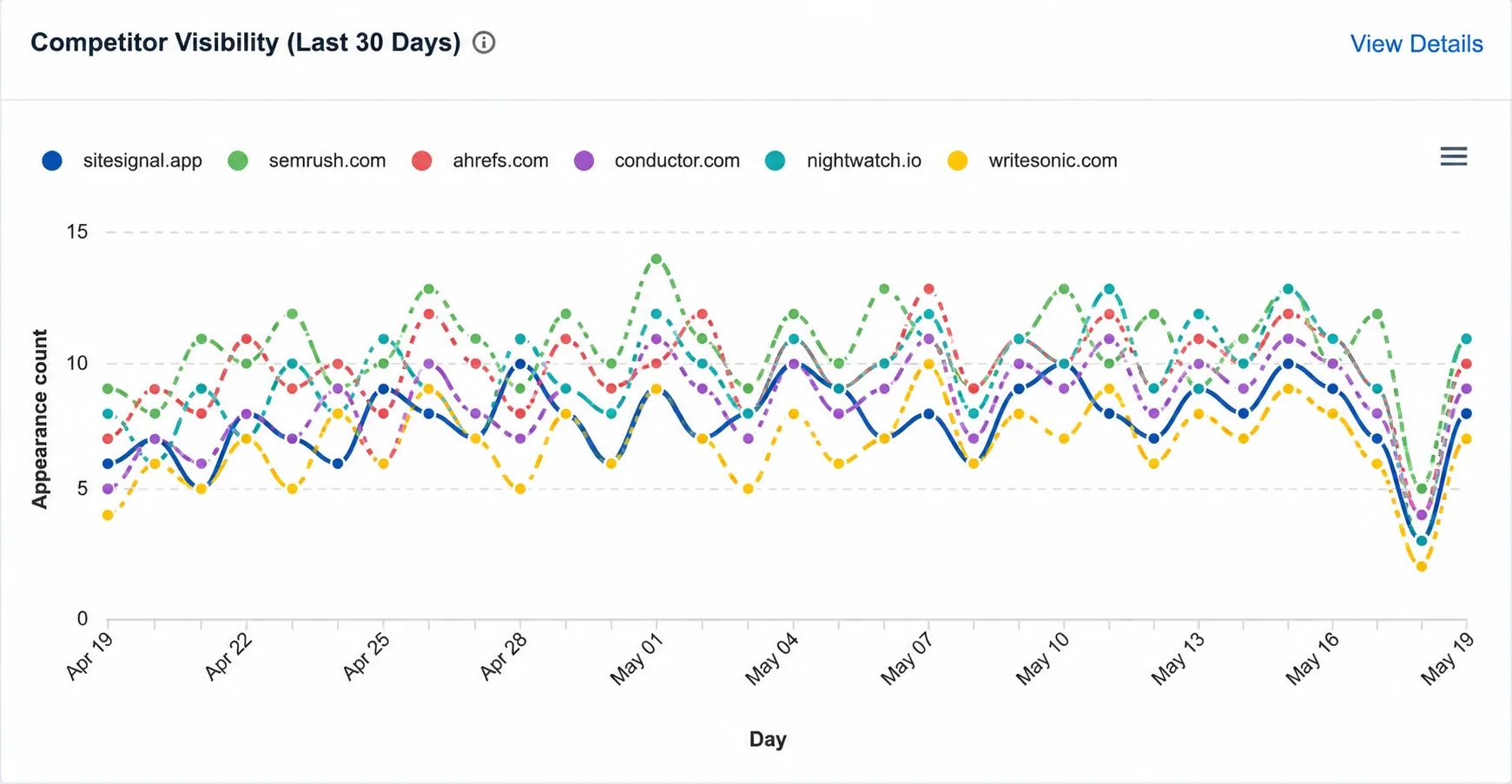
 Competitor intel
See exactly who AI prefers - and why.
Side-by-side recommendation share for every engine, plus the citations AI uses to make its case. Then a clear steer on what to change to flip it in your favour.
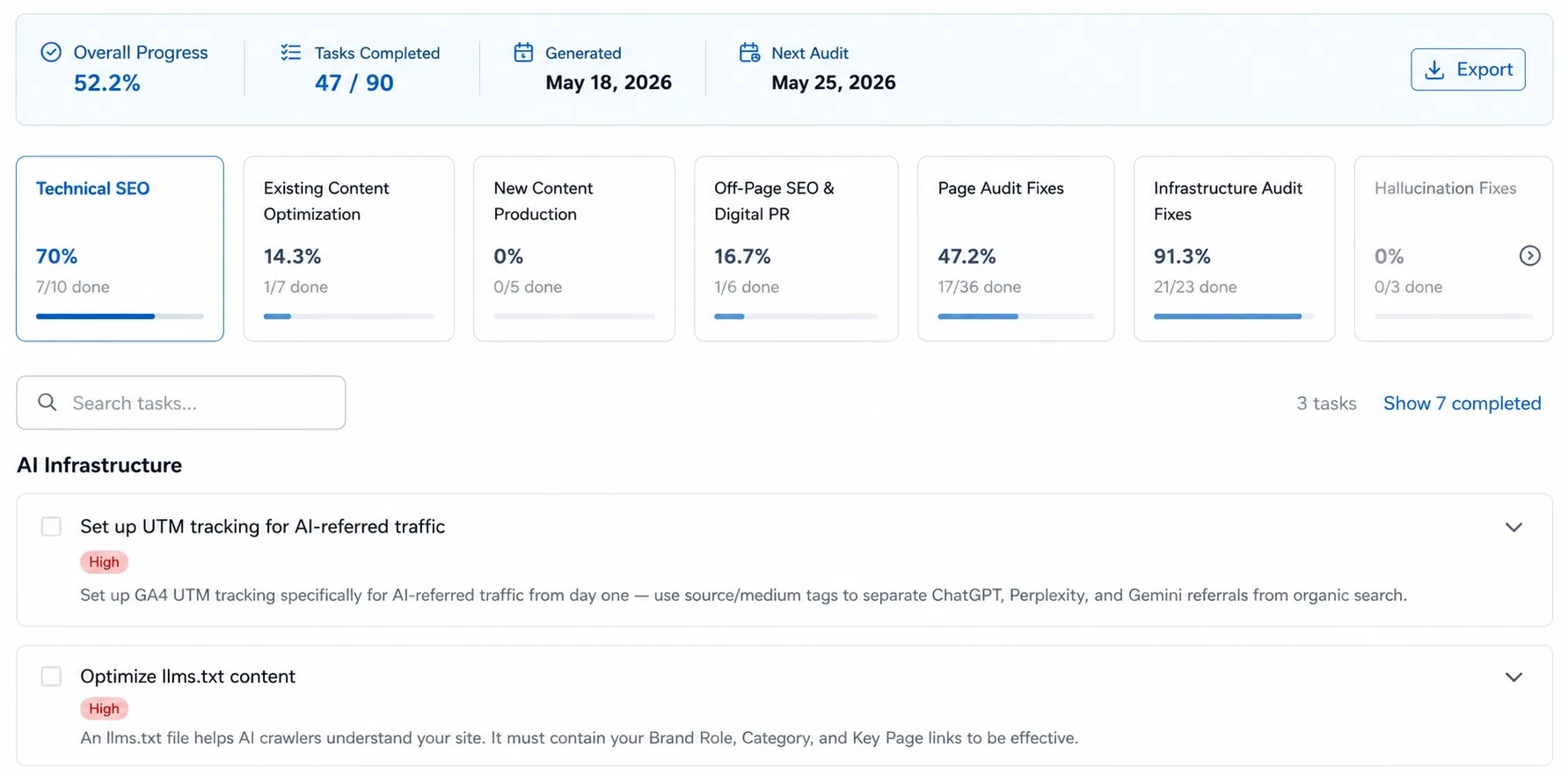
 Weekly action plan
A weekly plan that tells you exactly what to fix.
Ranked by impact, written in plain English. Hand it to your team or send it straight to your client. No jargon, no guesswork - just the next move.
 Website Monitoring Guide
Which website monitoring tools can alert you when rankings or performance drop?
Short answer: no single tool covers everything. Uptime monitors alert you to downtime, rank trackers alert you to keyword position changes, Core Web Vitals tools alert you to speed and performance issues, and AI visibility monitors like SiteSignal alert you when AI tools like ChatGPT or Perplexity stop mentioning you, or start saying something wrong. Most teams run at least two of these together.
Types of website monitoring tools
"Website monitoring" covers a few different jobs, and it helps to know which one you actually need:
- Uptime and infrastructure monitors check whether your site is online, how fast your server responds, and whether your SSL certificate is about to expire.
- Technical SEO and rank trackers watch your keyword positions in Google and alert you when a page drops out of the top results.
- Performance and Core Web Vitals monitors track page speed, layout stability, and responsiveness, and flag pages that slow down after a deploy or plugin update.
- AI visibility monitors are a newer category. They track whether AI tools like ChatGPT, Perplexity, and Google AI Overviews mention your brand at all, and whether what they say is accurate.
SiteSignal sits in the last two categories: it monitors uptime and page performance, and it's built specifically around AI visibility and hallucination detection, catching cases where AI gets facts about your business wrong.
Integration with SEO tools
SiteSignal doesn't track keyword rankings itself, so it isn't a replacement for a rank tracker like Semrush, Ahrefs, or Google Search Console. It's built to sit alongside those tools rather than duplicate them: your rank tracker tells you where you stand in Google's results, and SiteSignal tells you what's happening in the layer above that, how AI tools are describing and citing your site when they answer questions directly instead of showing a list of links.
Historical data tracking
Point-in-time alerts only tell you that something changed, not whether it's a pattern. SiteSignal keeps a history for the things it monitors, including a hallucination timeline that shows how AI accuracy about your brand shifts over time and how long a correction takes to propagate across AI providers after you fix something, plus audit history for your pages so you can see whether performance is trending up or down rather than just reacting to a single snapshot.
User reviews and ratings
Before picking a monitoring tool, it's worth reading independent reviews rather than relying only on the vendor's own claims. You can find SiteSignal reviews and listings on G2, Capterra, SaaSHub, and AlternativeTo.
Ease of use and setup
Setup takes minutes, not a dev sprint. As covered in the three steps above: you drop in your domain and a few competitors, and monitoring starts right away. There's no plugin to install and no code to add to your site, since SiteSignal checks your site externally rather than running inside your CMS. Most people have their first weekly action plan before they'd have finished configuring a heavier SEO platform.
Customization options for alerts
Not every alert matters equally to every business. You can prioritize what shows up in your weekly action plan, whether that's hallucination flags, a competitor overtaking you in AI answers, or an uptime or SSL issue. Exactly which alert types and delivery channels are available can vary by plan, so check your dashboard settings for the current options.
Compatibility with different platforms
SiteSignal works with any website, whether it's built on WordPress, Webflow, Shopify, a custom framework, or something else entirely. Because it monitors from the outside by checking your live site and public AI answers, there's no platform-specific plugin or integration required to get started.
Response time of alerts
Different signals move at different speeds, so SiteSignal checks them on different schedules. Uptime and SSL status are checked every 5 minutes, 24/7, so downtime gets caught quickly. AI visibility is tracked daily to catch shifts in how often and how accurately you're mentioned. Page audits run weekly, and everything gets rolled up into a new ranked action plan every Monday so you're not staring at raw alerts trying to figure out what matters most.
Mobile accessibility of monitoring tools
SiteSignal runs as a web dashboard, so you can check it from a phone or tablet browser without installing a separate app. For reviewing detailed charts, audit history, or a full weekly action plan, a larger screen is easier to read.
Related pages
- See the full breakdown of what's included: Features
- How real-time alerts work for small businesses: For SMEs
- Plans and what's included at each tier: Pricing
- Questions about your account: Contact & Support
- How your data is handled: Privacy
- A real example of AI citation growth: Case study: LLM seeding
Frequently asked questions
What's the difference between an uptime monitor and an AI visibility monitor?
An uptime monitor tells you if your site is reachable and responding. An AI visibility monitor tells you whether AI tools mention your site at all when someone asks a relevant question, and whether what they say about you is accurate. They catch completely different problems.
Can one tool track both keyword rankings and AI visibility?
Most tools focus on one or the other today. Traditional rank trackers were built for Google's list-of-links results, while AI visibility is a newer, separate signal about how AI-generated answers describe you. Running a rank tracker alongside a dedicated AI visibility tool like SiteSignal currently gives more complete coverage than expecting one tool to do both well.
How often should I check for ranking or performance drops?
It depends on the signal. Uptime issues need near-instant alerts since every minute of downtime costs traffic. Ranking and AI visibility shifts are more meaningful on a daily-to-weekly view, since day-to-day noise is common and a weekly rollup makes the real trend easier to see.
Does SiteSignal replace my rank tracker?
No. SiteSignal doesn't track keyword rankings, so it's meant to run alongside a rank tracker or Google Search Console, not instead of one. It covers uptime, page performance, and AI visibility, which most rank trackers don't monitor at all.
Is a free monitoring tool good enough?
Free uptime checkers can be fine for basic downtime alerts. But most free tools check infrequently, cover only one signal, and don't include AI visibility or hallucination detection at all, since that's a newer and more resource-intensive category to monitor.
How much do website monitoring tools cost?
It varies widely by category and depth of coverage. SiteSignal doesn't have a free plan, but includes a 7-day free trial with no card required, and paid plans start at $89 per month. See current details on the pricing page.
Glossary of key terms
Uptime monitoring Regularly checking whether your website is online and responding, usually every few minutes.
Core Web Vitals Google's set of page experience metrics covering load speed, interactivity, and visual stability.
AI visibility How often, and how accurately, a brand appears in answers generated by AI tools like ChatGPT or Perplexity.
Hallucination (AI) When an AI tool generates inaccurate or made-up information about a brand, product, or business.
SERP rank tracking Monitoring where a page ranks in Google's search results for specific keywords over time.
SSL certificate The security certificate that enables HTTPS; expired certificates can break access and trust signals.
Find out what AI is
saying about you
before your next meeting.
7-day free trial. No credit card. Your first action plan ready in minutes.