 SiteSignal
Your prospect thinks their website is fine. It loads fast. It ranks for its own name. Then you show them that ChatGPT, Perplexity and Google AI answered twelve buyer questions and named their competitors every time. Never them.
That is the meeting where they sign.
This guide shows you how to build that proposal in about an hour. You use four free tools and one slide template. You need no paid subscriptions to start.
Short answer: Run a free SiteSignal report to see what AI says about the prospect. Use Ahrefs for link strength, Similarweb for traffic and SplashDash for local presence. Paste the numbers into the proposal template. Open the meeting with what AI gets wrong about the business.
What you will build
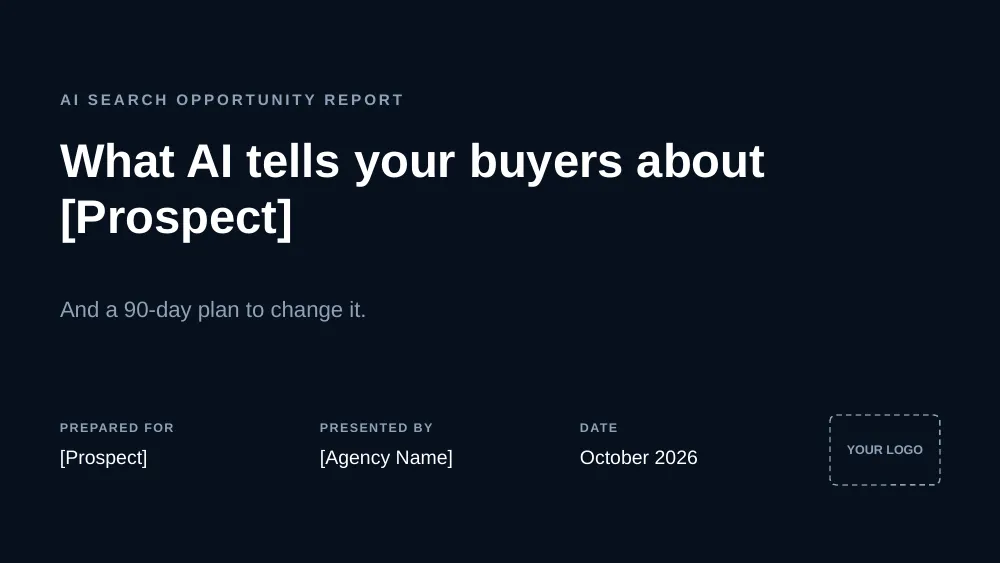
You will build a 22-slide AI Search Opportunity Report: 15 main slides and an appendix. AEO (Answer Engine Optimization) is the work of getting a brand named, and described correctly, in AI answers. This deck sells that work. We built a real one for an IoT connectivity company in Boise, Idaho. Their name is hidden in this guide. The numbers are real.
The deck tells one story:
- The finding. AI never names the prospect, and it gets key facts wrong (slides 2 to 5).
- Why it happens. Few pages AI can use, weak links, conflicting details, thin traffic (slides 6 to 10).
- The plan. Fix, build, grow, with six-month targets, proof and the price (slides 11 to 15).
Every number comes from a free tool. Every slide names its source. Your prospect can check any figure, which builds trust fast.
The four tools and what each one gives you
| Tool | What it shows | Slides it fills | Free access |
|---|---|---|---|
| SiteSignal | AI mentions, buyer questions, competitors AI names, pages AI cites, wrong facts, site health | 2, 3, 4, 7, 18, 19 | Free agency partner account: 10 branded reports a month |
| Ahrefs Backlink Checker | Domain Rating, backlinks, linking websites, top linking pages | 6, 8 | Free, no account needed |
| Similarweb | Monthly visits, engagement, devices, traffic channels including Gen AI | 9 | Free account, latest month only |
| SplashDash | Google Maps score, reviews, Moz Domain Authority, local population, keywords, top pages | 4, 10, 20 | Free Basic plan, no card |
Sign up for SiteSignal, Similarweb and SplashDash with your work Google account. Ahrefs needs no account. Setup takes about ten minutes.
Step 1: Show what AI says in SiteSignal
Start here. Your prospect has never seen this part, and it carries the meeting.
- Create a free agency partner account. Reports run on your own AI keys. One report costs about $0.35 in AI usage. The 5-minute setup video shows sign-up and where each key comes from.
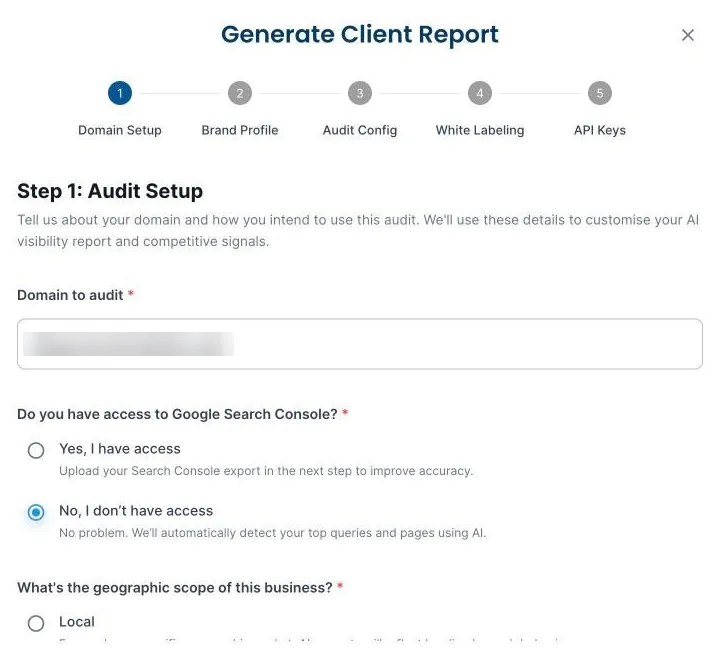
- Open Branded Reports and click Generate Report. Enter the prospect's domain. Say whether you have their Search Console (usually not). Pick local or global.
- Check the brand facts. SiteSignal reads the site and fills in the name, founder, year founded, headquarters, phone and industry. Correct anything wrong. These are the facts it tests AI against.
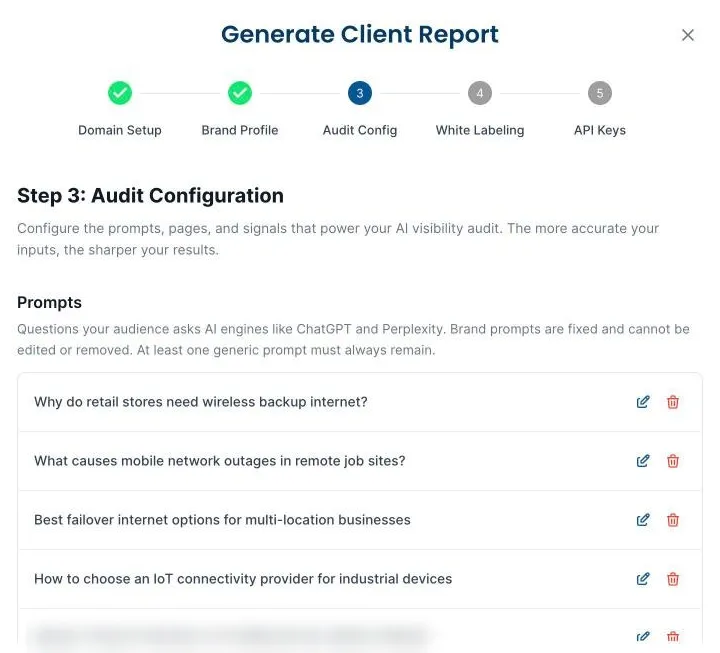
- Review the buyer questions. SiteSignal drafts the questions a customer would ask AI, such as "Best failover internet options for multi-location businesses". Edit them to match how the prospect's buyers talk. It finds the competitors AI names on its own.
- Add your agency name and logo, then generate the report.
Working in Claude? On the Agency plan you can skip the form. Connect the SiteSignal MCP server to your AI assistant and ask: "Create a branded AEO report for prospect.com." It runs the same steps: business facts, buyer questions, your branding and the report. Here is how to set it up.
What to copy into the proposal:
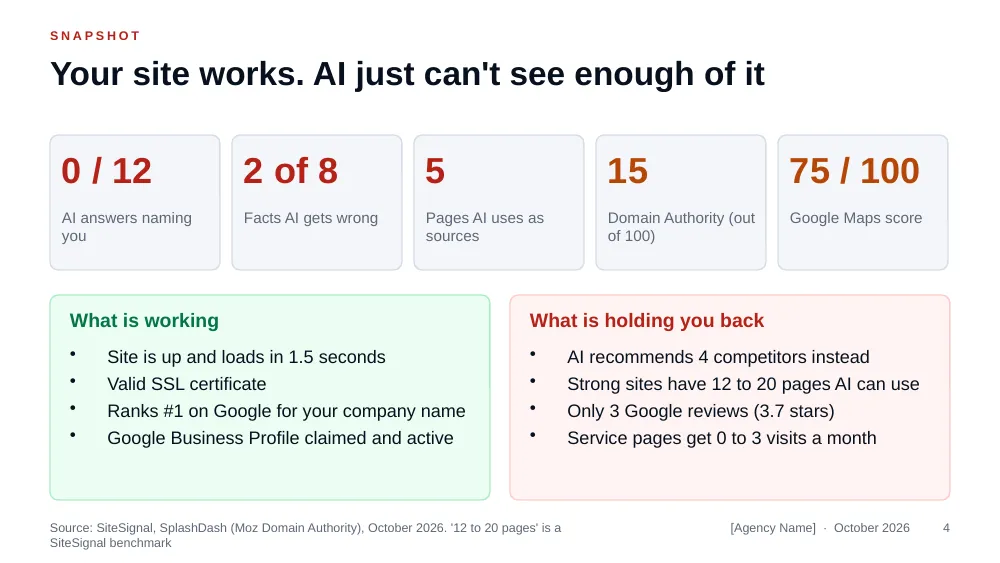
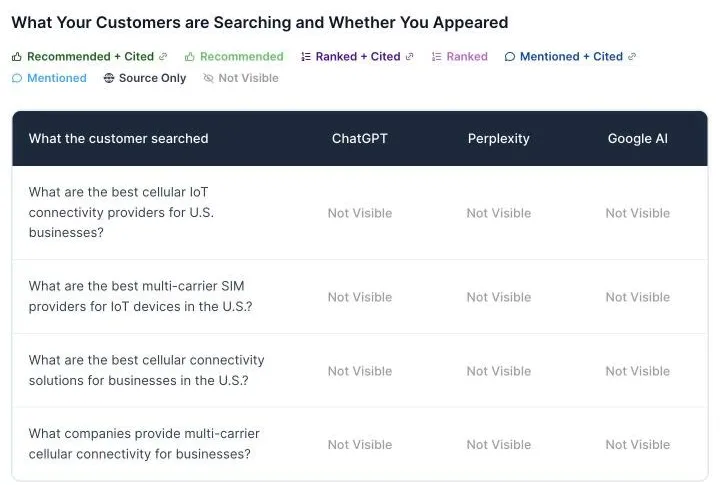
- AI mentions (slide 2). How many buyer-question answers named the brand. Our example: 0 of 12 across ChatGPT, Perplexity and Google AI.
- Competitors (slide 2). Who AI named instead. Our example: four competitors, each named in 2 to 4 of 8 answers.
- Buyer questions (slide 2). Screenshot the table that shows "Not Visible" for each question.
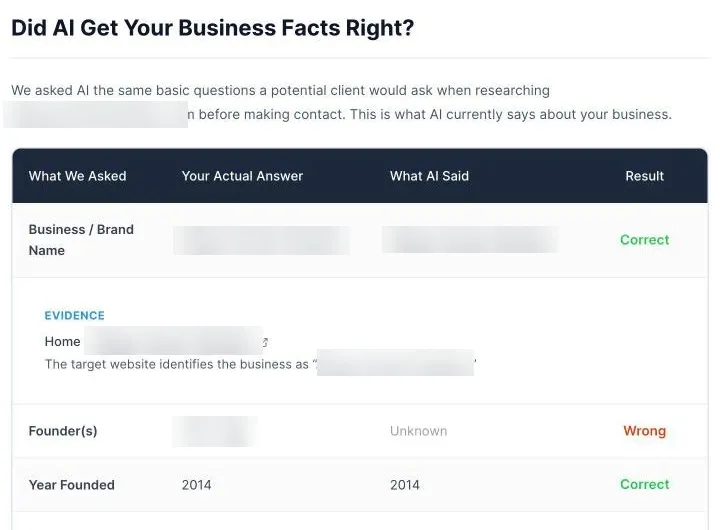
- Brand accuracy (slide 3). Which facts AI gets right and wrong. Our example: 6 of 8 correct. AI listed the founder as Unknown and put the headquarters in the wrong town. A wrong answer like this is called an AI hallucination.
- Cited pages (slide 7). How many of the prospect's pages AI uses as sources. Our example had 5.
- Source mix and technical health (slides 18 and 19).
Tip: The wrong-facts slide is your strongest slide. A prospect may shrug at low traffic. Nobody shrugs when AI gives their customers the wrong address.
Step 2: Check link strength in Ahrefs
- Go to ahrefs.com/backlink-checker. No account needed.
- Enter the prospect's domain.
- Copy Domain Rating, backlinks and linking websites.
- Read the list of linking pages. Count the real ones and the spam.
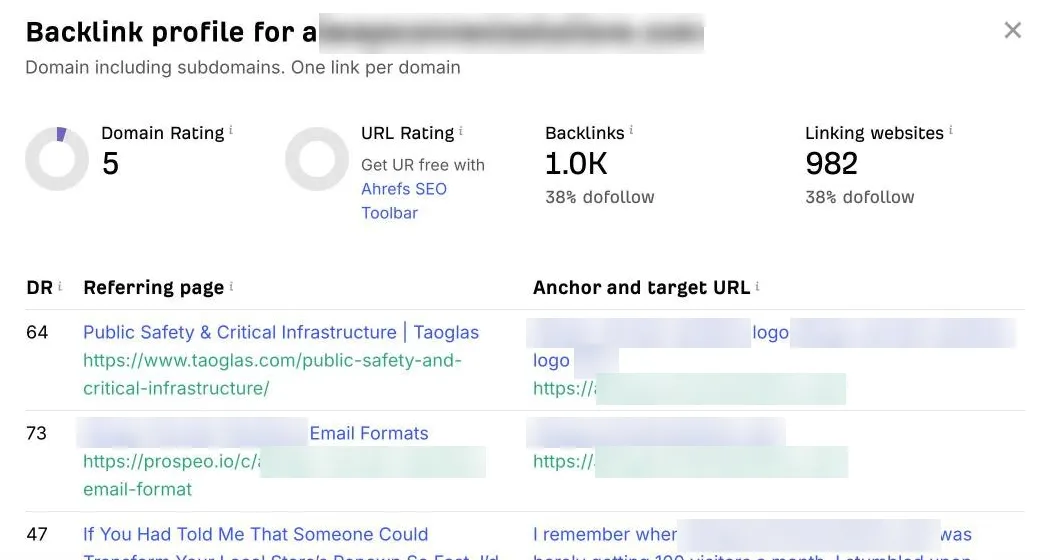
Our example had a Domain Rating of 5 and 982 linking websites. That sounds like a lot until you read the list. 17 of the top 20 were throwaway link-selling pages. AI and Google give those no weight. One partner page from a hardware maker was the kind of link that counts. That gap is part of why AI skips the brand.
Tip: Run the competitors through Ahrefs' free Website Authority Checker too. "You DR 5, them DR 40" makes the gap obvious.
Step 3: Measure traffic in Similarweb
- Sign in and search for the prospect's domain.
- On Website Performance, copy monthly visits, the change from last month, visit duration, pages per visit, bounce rate and the device split.
- Scroll to Marketing Channels. Copy the channel mix. Note the Gen AI bar. It shows how much traffic AI already sends.
The free account shows the latest month only. That is enough for a proposal.
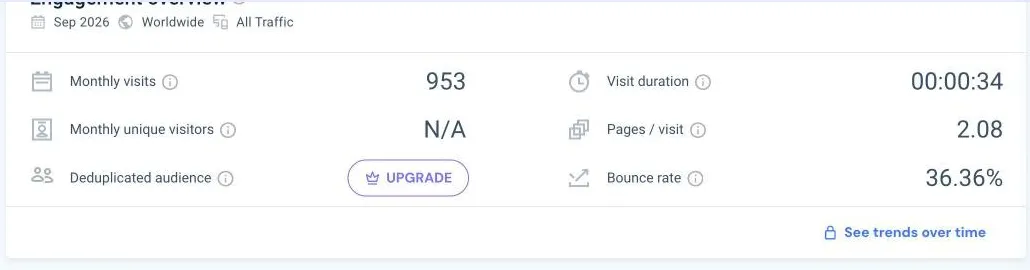
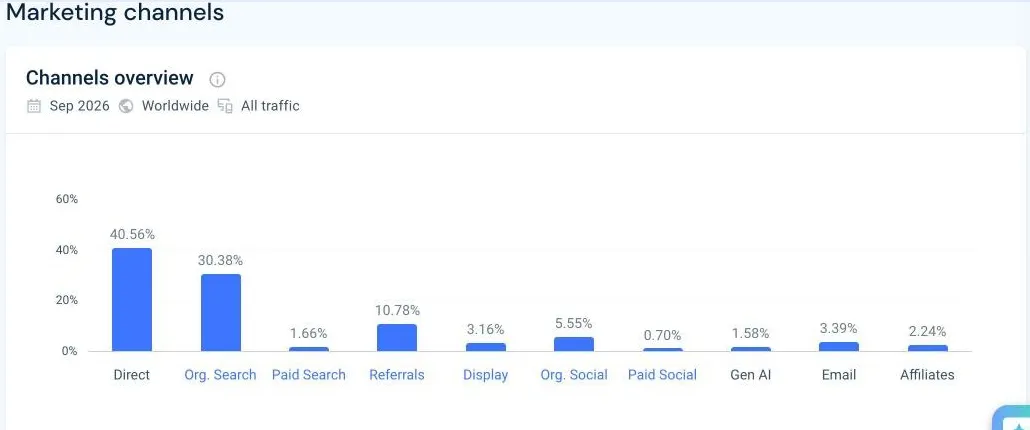
Our example had 953 visits in September 2026. 41% came direct, from people who already knew the brand. Gen AI sent 1.58%. That small number opens the conversation. It proves AI already sends buyers, just not many yet.
Step 4: Audit local presence in SplashDash
Skip this step for national or online-only businesses. Use it for anyone who serves a city or region.
- Sign in and choose Digital Presence under Actions.
- Enter the prospect's domain and city, then submit. The report takes about three minutes.
- From Business Overview and the Google Maps Audit, copy the review rating and count, the Google Maps score and anything flagged as missing.
- From Domain Metrics, copy Moz Domain Authority and spam score. SplashDash pulls these from Moz, so you need no Moz account.
- From Local Demographics, copy the market population and largest age group.
- From Top Website Pages and Top Keywords, copy the keyword count, organic visits and how much traffic lands on the homepage.
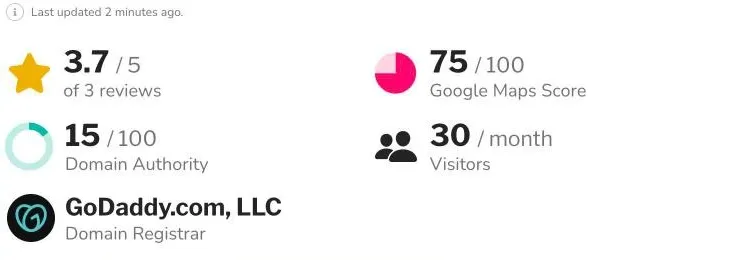
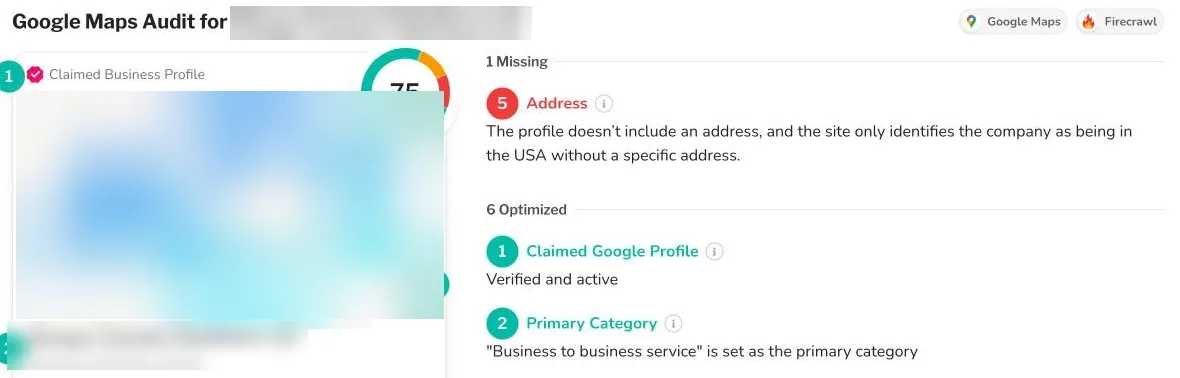
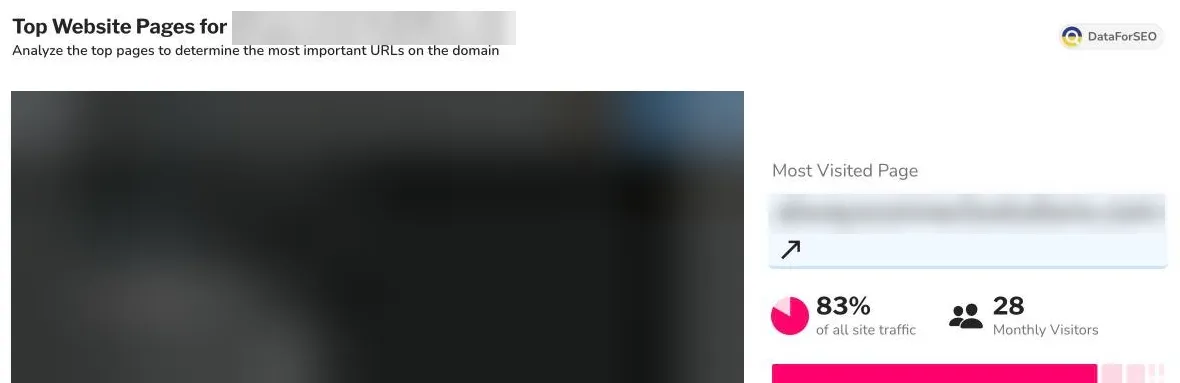
Our example: 3.7 stars from 3 reviews, a Google Maps score of 75, Domain Authority 15 and a local market of 443,730 people. The homepage took 83% of organic traffic. Only branded searches sent any visits.
Look for conflicts between tools. In our example, the About page and LinkedIn named one town. The privacy policy named a neighbouring town. The Google profile had no address at all. That conflict is the likely reason AI got the headquarters wrong. Connecting two data points like this shows real expertise.
Step 5: Fill in the template
- Replace "[Agency Name]", "[Prospect]" and the logo box.
- Fill in the snapshot on slide 4 first. It uses five numbers: AI mentions, facts wrong, pages AI uses, Domain Authority and Google Maps score.
- Paste each tool's numbers and screenshots into its slides.
- Keep the source line at the bottom of every data slide.
- Set your own price on slide 14. The template offers a 90-day pilot and a 12-month programme. Change both to fit your market.
Every slide has speaker notes. They tell you which tool each number comes from and what to say.
Step 6: Run the meeting
Use this order. It moves from what the prospect believes to what they do not know.
- Open with the gap. 0 of 12 answers. Competitors named instead. Pause. Let them read it.
- Show the wrong facts. This is the moment the room goes quiet.
- Show what works. The site is up, fast and secure. The problem is fixable.
- Fill in the cost slide together. Their numbers, not yours.
- Show the causes. Few pages AI can use, weak links, conflicting details.
- Show the plan and the price. Offer to fix the address conflict in week one, free. It proves you deliver.
Step 7: After they sign, keep proving results
The proposal is a snapshot. Your client pays every month to see the numbers move.
Move the client onto SiteSignal's Agency plan. It costs $399 a month for 3 client domains, plus $89 for each extra domain. Each domain gets 60 buyer questions checked every month and a weekly action plan. You also get white-label monthly reports and 50 branded prospect reports a month.
Put each month's numbers next to the proposal's numbers. "0 of 12 in October, 5 of 12 in January" is the slide that renews the contract.
Get the free proposal kit
The kit includes the free partner account and this 22-slide template with speaker notes.
Frequently asked questions
Do I need paid accounts to build an AI search proposal?
No. SiteSignal's agency partner account, Ahrefs' Backlink Checker, Similarweb and SplashDash all have free options. Free tiers limit how many reports you run, which is enough for several proposals a week.
How long does one AEO proposal take?
About an hour once you know the tools. Your first one may take two hours.
What if the prospect already appears in AI answers?
Then focus on accuracy and position. A brand can appear and still be described wrongly, or appear below every competitor.
Which buyer questions should I test?
The questions a customer asks before they know any brand names. "Best [service] in [city]" and "How do I [solve problem]" work well.
Can I put my agency's branding on the SiteSignal report?
Yes. Branded prospect reports are included on the free agency partner account. White-label monthly client reports come with the Agency plan.
Does the free SiteSignal account cost anything to run?
Reports run on your own AI keys. One prospect report costs about $0.35 in AI usage.